
MonthMay 2013

Creating An RPM From Tar File

RPM packages are a great way of packaging and distributing software, unfortunately some stand alone software is distributed as a zip or tar file to be installed that way. By converting these into an RPM you can use your package manager as a distribution and removal tool. For this example we will be creating an RPM for the Example Software.

  • The first thing to do is install the RPM development tools, you should only require rpmbuild.
  • Create a folder to be used as a RPM development area and then create a file called .rpmmacros in your home folder that contains the following line: %_topdir <your build folder>
  • Set up your RPM build area by creating the following folders – BUILD BUILDROOT RPMS SOURCES SPECS SRPMS
  • Get a copy of your tar.gz or zipped software and place it in the SOURCES directory.
  • Now the key part of this is to create the .spec file as this describes the build and installation part of the RPM.
  • Create a new file in the SPECS folder called example.spec, fill it out with the following information –

  •  After your spec file is created run rpmbuild -bb ./SPECS/example.spec – fix any errors that are produced, most likely problems will come from getting the correct version/name and target architecture.
  • Find your completed RPM in ./RPMS/<ARCH>

Done!


Offshore Expedition May 2013

I am lucky enough to be a programmer who doesn’t have to spend his whole life in an office churning out software, sometimes if the software isn’t good enough we get to venture out to sea and apply some frontline support!

I’ve been on several trips and they have been a great experience, if extremely tiring. Here’s a selection of photos from my most recent trip to the cold north (it’s actually very nice).

HTC One X and Jawbone Up Problems

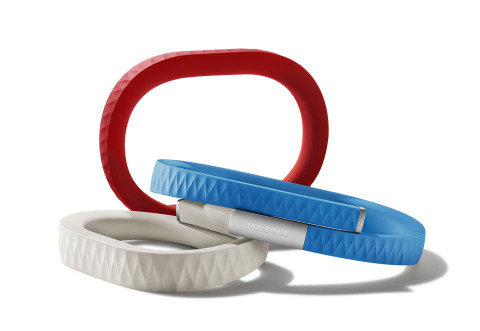
I got quite excited about the recent push into wearable computers and bought a Jawbone Up to keep track of everything I do. It is a neat system that tracks sleep and movement during the day, it also comes with an excellent mobile application for keep track of this data. Data is transferred from the band using the 3.5mm headphone jack which I thought was quite smart. Only problem? It doesn’t work with the HTC One X, pretty much the only phone it doesn’t work with.

I have tried pretty much everything to get it working and also got in touch with Jawbone to find out what was going on (complete lack of communication and information regarding this issue). After a month they decided to get back to me. The emails are at the bottom of this post.

It looks like I will have to replace either the phone or the band. I was looking at getting the Fitbit Flex as it transfers over Bluetooth which is a much better system. Although I’ve heard there are issues with various Android phones and that also!


Jack Concanon 

Apr 05 00:36 (PDT)

Hello there,

I was just wondering on the state of support for the HTC One X and whether
it is dependant on hardware or software of the phone? I am currently
running a custom jellybean ROM with no sound equalising software installed,
when I connect the band to the phone and attempt to sync it does flash
red/green as though it is transferring but it always fails. It does work
fine on a Nexus 4.

I have tried checking logging output and can’t see anything obvious from
the phone.

Anyway, great product just wondering if there is a problem with the phone
hardware itself or if I can just install a different rom? I see on the
supported device list the American HTC One X+ is unsupported but there are
some hardware differences between the two phones and the European models.

Many thanks,
Jack Concanon


Peter (Jawbone Support) 

May 09 05:14 (PDT)

Hello Jack,

Thanks for your email and apologies for the delay in correspondence.

As far as we know – this is not dependant on the ROM installed, although custom ROMs can run into various issues, this HTC ONE X issue seems to be more hardware-related.

You can however try (if you haven’t done so already)
– Uninstalling the App
– Check that Bluetooth is off (has affected some Android models)
– Check that the volume it turned on for ringtone, media, notifications and system (usually accessed by pressing a volume up/down button, hen pressing the gear icon beside the volume control – as we were looking at earlier, this can affect sync on iOS, so it’s worth exploring on Android)

– power cycle the phone


Kind regards,

Peter
Jawbone EU Support Team
www.jawbone.com

Phone: +44 (0) 203 027 2094
Fax: +44 (0) 141 248 8142

UK HOURS OF OPERATION
Weekdays 8AM-5PM (UK Time)


Unit Testing C# With Data in Visual Studio 2012

When writing unit tests it is likely you will  need to include some additional input files containing data or settings etc. If you’re trying to include some data for a C# unit test and are using Visual Studio 2012 follow this guide –

  1. Add a separate folder for data to the project then ‘add an existing item’ and select your files.
  2. In the Solution Explorer, navigate to your newly added file, right click and go to properties.
  3. Set ‘Copy to Output Directory’ to an appropriate option.
  4. When you want to use this data in a unit test add the following before the function – [DeploymentItem(“Data”, “Data”)]

The line in the last step will copy all data from Data in your build directory to the a new folder in the test directory.

I presume that these instructions will apply to older versions of Visual Studio.


Optimising C++ The STL Way

A co worker emailed out an interesting question, how would we optimise the following piece of code –

The code looks fast, light and up to the job right? Sure, it will work fine and it will be reasonably fast, but it can always be faster. The first obvious waste of time is with the sort; sorts are lengthy beasts and as much as possible should be done to minimise their impact. The aim of this function is to get the average of the k smallest values in the array, imagine if the array is ten thousand elements big and you only need the average of the two smallest? Sorting that entire array just to get two values is a waste of time.

So, how do we optimise this? My lecturer at university always used to tell us how good the STL is and that it was nearly always better and faster than anything we can write. The obvious solution is to move away from the primitive programming shown in the above function and see what the STL can do for us; luckily enough there are several great functions that do exactly what we want. The first great time saver is the partial sort which simply sorts the array in such a way that the range we specify contains the sorted elements but anything above that middle point is left unsorted. Simply using this method would save a large amount of time over the original method of doing a full sort.

The only requirement of these improvements is to change the function parameters to accept a vector rather than a float array, luckily there were no rules set in the original question!

In order to show that these changes would be faster I wrote some code to prove it. It runs the old function and the new function ten thousand times with the same data and calculates the time taken based on clock cycles. The quicker the better. Take note that the time also includes creating a copy of the input array. If we just pass in the array it will be sorted in place so in reality we are testing how quick it is on already sorted data.

And the results speak for themselves, across ten thousand iterations of each function the STL function is generally twice as fast.

Original function: (0.0157705) 20.56 sec
STL function: (0.0157705) 7.75 sec

I think I should finally commit to using this site for something. Anytime I find out something useful or create something that has a remote chance of being reused I will stick it on here.

Maybe it could actually live up to the Acodemic name.

Vinaigrette Sort

When programming in C for embedded systems where memory, disk usage and CPU usage are all very strict there are several ‘rules’ in place such as not use dynamically allocated arrays; this ensures that you can retain more control over memory management.

In a recent experience I had a fixed size array which was always populated below capacity, this array needed to be sorted which would normally leave my zero initialised elements at the start of my array and mess up my loop logic further on in the program.

I had an idea that I could use my sort comparison function to do two things – the first is the original sort purpose of ordering my elements, the second would be to move all unused elements to the end of the array.

Guess what, it’s very simple! I present the vinaigrette sort (so called because the oil and vinegar separate into layers in a vinaigrette).

It is as simple as modifying the compare function required by the qsort function. Check if a field in your struct (or your data) is zero and therefore unused and then declare it as ‘greater’ than any comparison. I did find that an older GCC version (3.7) required the line as described in the above source code, GCC 4.7 compiled and ran as required with just the one comparison.

Note the memset line, if you leave the array uninitialised then the compare won’t have anything defined to search for that would signify an unused element.

© 2026 Acodemics

Theme by Anders NorénUp ↑